本文最后更新于 289 天前,如有错误请邮件至 zhiligyi222na@gmail.com
Hutool工具类
Excel导出
通过输出流的方式导出数据
导出数据流程
- 拿到所有数据
- 构建ExcelWriter
- 设置中文表头
- 写出数据到writer
- 设置输出的文件名称以及输出流的信息
- 写出到输出流并关闭writer
默认的,未添加alias的属性也会写出,如果想只写出加了别名的字段,可以调用此方法排除
writer.setOnlyAlias(true);
    /**
     * 导出数据
     */
    @GetMapping("/export")
    public void exportData(HttpServletResponse response) throws Exception {
        // 1.拿到所有数据
        List<Admin> list = adminService.selectAll();
        // 2.构建Writer对象
        ExcelWriter writer = ExcelUtil.getWriter(true);
        // 3.设置中文表头
        writer.addHeaderAlias("username", "账号");
        writer.addHeaderAlias("name", "名称");
        writer.addHeaderAlias("phone", "电话");
        writer.addHeaderAlias("email", "邮箱");
        // 默认的,未添加alias的属性也会写出,如果想只写出加了别名的字段,可以调用此方法排除
        writer.setOnlyAlias(true);
        // 4.写出数据到writer
        writer.write(list);
        // 5.设置输出文件的名称
        response.setContentType("application/vnd.openxmlformats-officedocument.spreadsheetml.sheet;charset=utf-8");
        String fileName = URLEncoder.encode("管理员信息", StandardCharsets.UTF_8);
        response.setHeader("Content-Disposition", "attachment;filename=" + fileName + ".xlsx");
        // 6.写出到输出流,并关闭writer
        ServletOutputStream os = response.getOutputStream();
        writer.flush(os);
        writer.close();
        os.close();
    }
异常处理,缺少依赖

加上 poi-ooxml 依赖
        <!-- 处理office文件的依赖 -->
        <dependency>
            <groupId>org.apache.poi</groupId>
            <artifactId>poi-ooxml</artifactId>
            <version>5.2.3</version>
        </dependency>
前端调用
const exportData = () => {
  window.open('http://localhost:9999/admin/export')
}
条件导出

null 传到后端是一个字符串 “null”
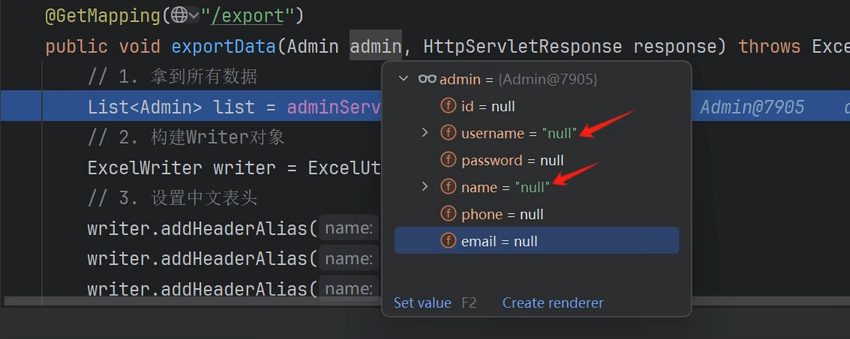
在查询语句里面加上空字符串的判断

根据选择项导出
解析参数
String ids = admin.getIds();
        if (StrUtil.isNotBlank(ids)){
            String[] idsArr = ids.split(",");
            admin.setIdsArr(idsArr);
        }
查询的 sql
    <select id="selectAll" resultType="org.example.springdemo.entity.Admin">
        select * from `admin`
        <where>
            <if test="username != null and username != ''">username like concat('%',#{username},'%')</if>
            <if test="name != null and name != ''">and name like concat('%',#{name},'%')</if>  <!--相当于 name like '%1%'-->
            <if test="ids != null and ids != ''">
                and id in
                <foreach collection="idsArr" open="(" close=")" separator="," item="id">
                    #{id}
                </foreach>
            </if>
        </where>
        order by id desc
    </select>
参数的格式

前端的导出方法
const exportData = () => {
  let idsStr = data.ids.join(",")   // 把数组转换成字符串 [ 1,2,3 ] => " 1,2,3 "
  let url = `http://localhost:9999/admin/export?username=${data.username === null ? '' : data.username}`
  + `&name=${data.name === null ? '' :data.name}`
  +`&ids=${idsStr}`
  window.open(url)
}
Excel导入
导入数据流程
- 获取输入流,构建Reader对象
- 通过Reader读取excel里面的数据
- 将数据写到数据库
    /**
     *批量导入数据
     */
    @PostMapping("/import")
    public Result importData(MultipartFile file) throws Exception {
        // 1.拿到输入流,构建reader
        InputStream inputStream = file.getInputStream();
        ExcelReader reader = ExcelUtil.getReader(inputStream);
        // 2.通过Reader读取excel里面的数据
        reader.addHeaderAlias("账号", "username");
        reader.addHeaderAlias("名称", "name");
        reader.addHeaderAlias("电话", "phone");
        reader.addHeaderAlias("邮箱", "email");
        List<Admin> list = reader.readAll(Admin.class);
        // 3.将数据写到数据库
        for (Admin admin : list) {
            adminService.add(admin);
        }
        return Result.success();
    }
前端页面
      <el-upload
          style="display: inline-block; margin-left: 10px"
          action="http://localhost:9999/admin/import"
          :show-file-list="false"
          :on-success="handleImportSuccess"
      >
        <el-button type="success">批量导入</el-button>
      </el-upload>

const handleImportSuccess = (res) => {
  if (res.code ==='200') {
    ElMessage.success('批量导入成功')
    load()
  } else {
    ElMessage.error(res.msg)
  }
}